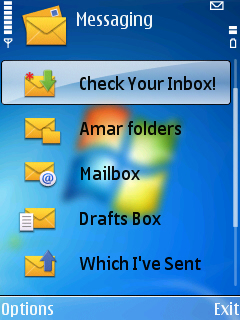

অনেক দিন অপেরা এন্ড অন্যান্য সফটওয়্যার মোডিফাই করেছিলাম কিন্ত আজকে আপনাদেরকে একটা বিল্ড ইন এপ্লিকেশন মোডিফাই করা শিখাবো সেটা হল মেসেজ বক্স এডিটিং নিচের ছবিটার মত
দরকারি জিনিস পত্র গুলা হল সেট হ্যাক তাকতে হবে পাইথন ইন্সটল করা তাকতে হবে এন্ড এক্সপ্লর ইন্সটল করা থাকতে হবে এখন নিচের লিঙ্ক থেকে হেক্স এডিটরটি ডাওনলোড করে নিন
now using xplore goto z\resource\messaging and copy msgs.r01 then file ta memory carder jekono jaigai rakhun
tarpor file tate giye read only unmark korun xplore e 6 press kore
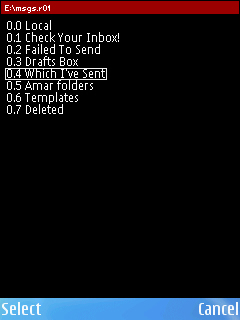
tarpor mobilhex diya msgs.r1 open korun tarpor mobilhex e 5 press koron tokhon nicher photo tar motho asbe
then shekane apnar icche motho name gola change kore save korun
ekhon xplore open kore c\resource\ e giye messaging name diye ekta folder banan then edit kora msgs.r1 file ta c\resource\messaging e paste kore set restart korun tarpor message e giye dekhun apnar change kora name gola message option e esheche kina